
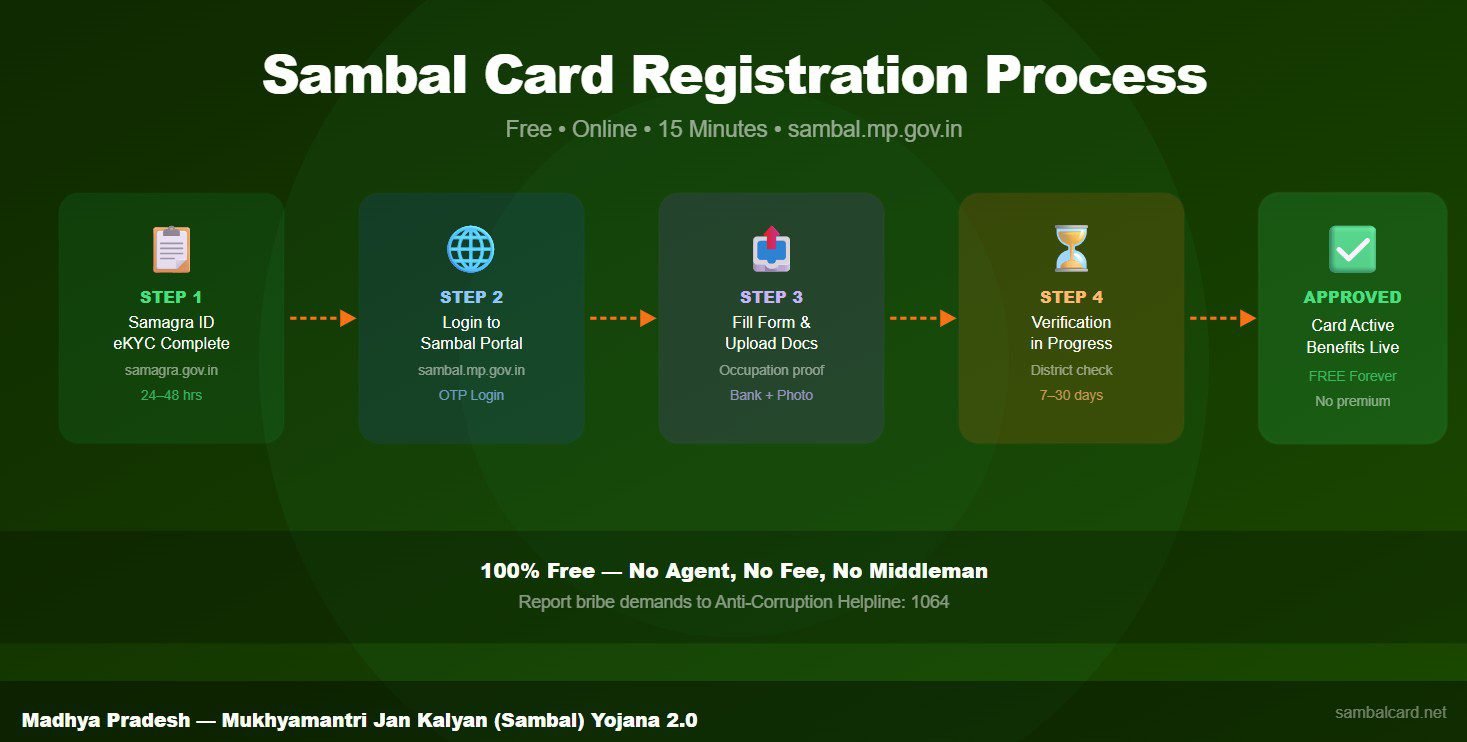
Sambal Card registration is the first step to accessing ₹4 lakh accident cover, ₹16,000 maternity benefit, and education scholarships for your children under the Mukhyamantri Jan Kalyan Yojana. Furthermore, registration is completely free — no agent or CSC operator can charge you a single rupee. This guide covers every step of the Sambal Card registration process for 2026, both online and offline.
What Is Sambal Card Registration?
Sambal Card registration is the official enrolment process that adds an unorganized sector worker to the Madhya Pradesh government’s Jan Kalyan Yojana database. Once registered, the worker receives a digital Sambal Card linked to their Samagra ID and Aadhaar. Consequently, all benefits — death, accident, maternity, and education — are linked to this single card. Additionally, the card activates Direct Benefit Transfer (DBT) to the worker’s bank account, so payments arrive without any middleman.
Who Can Register for Sambal Card 2.0?
You must meet all five criteria below to complete Sambal Card registration successfully:
- Residence: Permanent resident of Madhya Pradesh
- Age: Between 18 and 60 years old
- Occupation: Working in the unorganized or informal sector (construction, agriculture, domestic work, street vending, etc.)
- Income: Annual family income below ₹2.5 lakh
- Tax status: Not an income tax payer; not covered under EPF or ESIC
If you are unsure whether you qualify, use our Sambal Card Eligibility Checker to get an instant result in 60 seconds.
Documents Required for Sambal Card Registration
Gathering documents before you begin saves significant time. The following documents are mandatory for all applicants:
- Samagra ID — 9-digit member ID with eKYC completed (mandatory)
- Aadhaar Card — mobile number must be linked for OTP verification
- Bank passbook or account details — in your own name, with IFSC code
- Passport size photographs — 2 to 3 recent photos
- Occupation proof — contractor letter, Khasra document, or Gram Panchayat certificate depending on your worker type
For a worker-type-specific document checklist, visit our Sambal Card Documents Checklist Generator. It creates a personalised list based on your occupation in under a minute.
How to Complete Samagra eKYC Before Applying
Samagra eKYC is a mandatory prerequisite for Sambal Card registration. Without it, your application will be rejected at the first stage. Therefore, complete eKYC before you do anything else.
Follow these steps to complete Samagra eKYC:
- Visit samagra.gov.in
- Click on “eKYC” from the main menu
- Enter your 9-digit Samagra ID and your mobile number
- Enter the OTP sent to your Aadhaar-linked mobile
- Verify your biometric or OTP details
- Wait 24 to 48 hours for eKYC status to reflect
If your OTP is not arriving, check whether your mobile number is linked to your Aadhaar. You can update the Aadhaar-mobile link at any Aadhaar Seva Kendra. Use our Samagra eKYC Readiness Checker to verify your status before applying.
Sambal Card Online Registration — Step-by-Step Process
Online Sambal Card registration is the fastest method. You need a smartphone or computer with internet access, your Aadhaar-linked mobile number, and your Samagra ID with eKYC completed.
- Open sambal.mp.gov.in in your browser
- Click “Login” and enter your Samagra ID
- Enter the OTP sent to your registered mobile number
- Select “Apply for Sambal Card” from the dashboard
- Your details from Samagra will auto-populate — verify them carefully
- Select your occupation type from the dropdown menu
- Upload occupation proof document (scanned copy or photo)
- Upload bank account details
- Upload a recent passport photograph
- Click “Submit Application” and note your reference number
After submission, the portal will display a reference number. Save this number — you will need it to track your application status. Processing typically takes 7 to 30 days, depending on verification load at the district level.
Offline Registration via CSC Centre
If you do not have internet access or face portal errors, you can register offline at your nearest Common Service Centre (CSC) or Gram Panchayat. This method is equally valid and results in the same Sambal Card. However, always carry originals and self-attested photocopies of all documents.
At the CSC centre, inform the operator that you want to apply for Sambal Card 2.0. The operator will log in to the portal and fill the form on your behalf. Importantly, the service is completely free — if anyone asks for money, refuse and report them to the MP Anti-Corruption Helpline at 1064.
Common Registration Errors and How to Fix Them
Several applicants face errors during Sambal Card registration. The most common issues and their solutions are listed below:
- “Samagra eKYC not found”: Your eKYC is not yet reflected. Wait 48 hours after completing eKYC on samagra.gov.in and try again.
- “Aadhaar OTP failed”: Your Aadhaar mobile link is missing or outdated. Visit an Aadhaar Seva Kendra to update it.
- “Income exceeds limit”: Income data from Samagra is above ₹2.5 lakh. Get an official income certificate from your Tehsildar and submit it as supporting document.
- “Occupation proof rejected”: The uploaded document is unclear. Rescan or retake the photo in good lighting and resubmit.
- Portal not loading: Try Chrome in incognito mode during off-peak hours (early morning or late evening). Alternatively, use the CSC centre.
For portal-specific errors, use our Sambal Portal Error Decoder to identify the exact cause and fix in seconds.
How to Track Your Sambal Card Registration Status
After submitting your application, tracking its progress is simple. Visit sambal.mp.gov.in, log in with your Samagra ID, and check the application status on your dashboard. The status will show one of three stages: Under Verification, Approved, or Rejected.
If the status shows “Under Verification” for more than 30 days, file a grievance on the portal. Additionally, you can call the MP Government Helpline at 181 with your application reference number to request an update. For a detailed escalation guide, read our Complaint and Grievance Guide.
What Happens After Successful Sambal Card Registration
Once your application is approved, the Sambal Card is issued digitally and linked to your Samagra profile. You do not receive a physical card by post. Instead, you can download your card directly from sambal.mp.gov.in using your Samagra ID. Your card activates all benefits immediately upon approval — accident cover, maternity benefit, education scholarship, and funeral assistance are all active from the date of registration.
Register a nominee immediately after approval. The nominee is the person who will receive death and accident benefits if you pass away. Without a registered nominee, your family cannot claim ₹4 lakh in benefits. Use our Nominee Registration Guide to complete this in 5 minutes.
Frequently Asked Questions About Sambal Card Registration
How long does Sambal Card registration take?
After online submission, verification typically takes 7 to 30 days. If no issues arise during verification, the card is approved and issued within this period. CSC-assisted applications may take slightly longer depending on the district office workload.
Is there a fee for Sambal Card registration?
No. Sambal Card registration is completely free of charge. Neither the government portal nor any CSC centre is authorised to charge any fee. If you are asked to pay, refuse and report the demand to the Anti-Corruption Helpline at 1064.
Can I apply for Sambal Card on my mobile phone?
Yes. The Sambal portal (sambal.mp.gov.in) works on mobile browsers. Open Chrome or Firefox on your smartphone, visit the portal, log in with your Samagra ID, and complete the application. Ensure your phone camera is working for document uploads.
My application was rejected. Can I reapply?
Yes. Find the specific rejection reason on the portal, fix the issue, and submit a fresh application. Common rejection reasons include incomplete eKYC, name mismatch between Aadhaar and Samagra, and income above the limit. Use our Rejection Reason Finder to identify and fix the issue quickly.
Do I need to renew the Sambal Card every year?
No. Sambal Card registration is a one-time process. The card remains active as long as you meet the eligibility criteria. However, education scholarships for your children must be claimed annually each academic year. Ensure your Samagra eKYC stays current to avoid benefit disruptions.