
Jankalyan Portal is the commonly used alternate name for the official Madhya Pradesh Sambal Yojana portal at sambal.mp.gov.in. Many workers, CSC operators, and even government officers use the terms “Jankalyan portal” and “Sambal portal” interchangeably — because the scheme’s full name is Mukhyamantri Jan Kalyan Yojana. This guide explains the Jankalyan portal login process, registration steps, and every key function available on the portal so you can use it confidently.
What Is the Jankalyan Portal?
The Portal refers to sambal.mp.gov.in — the official online platform for the Mukhyamantri Jan Kalyan (Sambal) Yojana 2.0. “Jan Kalyan” literally means “public welfare,” which is the official name of the scheme. As a result, many workers search for “Jankalyan portal” when they actually mean the Sambal portal. Both names lead to the same destination — the official portal for Sambal Card registration, status tracking, benefit claims, and card download.
There is no separate website called “Jankalyan portal” — the correct URL is always sambal.mp.gov.in. If you encounter any website claiming to be the “Jankalyan portal” with a different URL, it is likely a phishing site — do not enter your Samagra ID or Aadhaar details there.
Portal Login — Step-by-Step
Logging in to the Jankalyan portal (sambal.mp.gov.in) requires your Samagra ID and an OTP sent to your registered mobile number. Follow these steps:
- Open Chrome or Firefox and navigate to sambal.mp.gov.in
- Click the “Login” button on the homepage
- Enter your 9-digit individual Samagra member ID
- Click “Send OTP” — an OTP arrives on your Aadhaar-linked mobile within 2 minutes
- Enter the OTP in the field provided
- Click “Login” to access your Sambal/Jankalyan dashboard
After login, your dashboard shows your application status, active benefits, card download option, nominee details, and grievance filing option. If OTP is not arriving, check our Portal Error Decoder for the fix.
Portal Registration — New Applicants
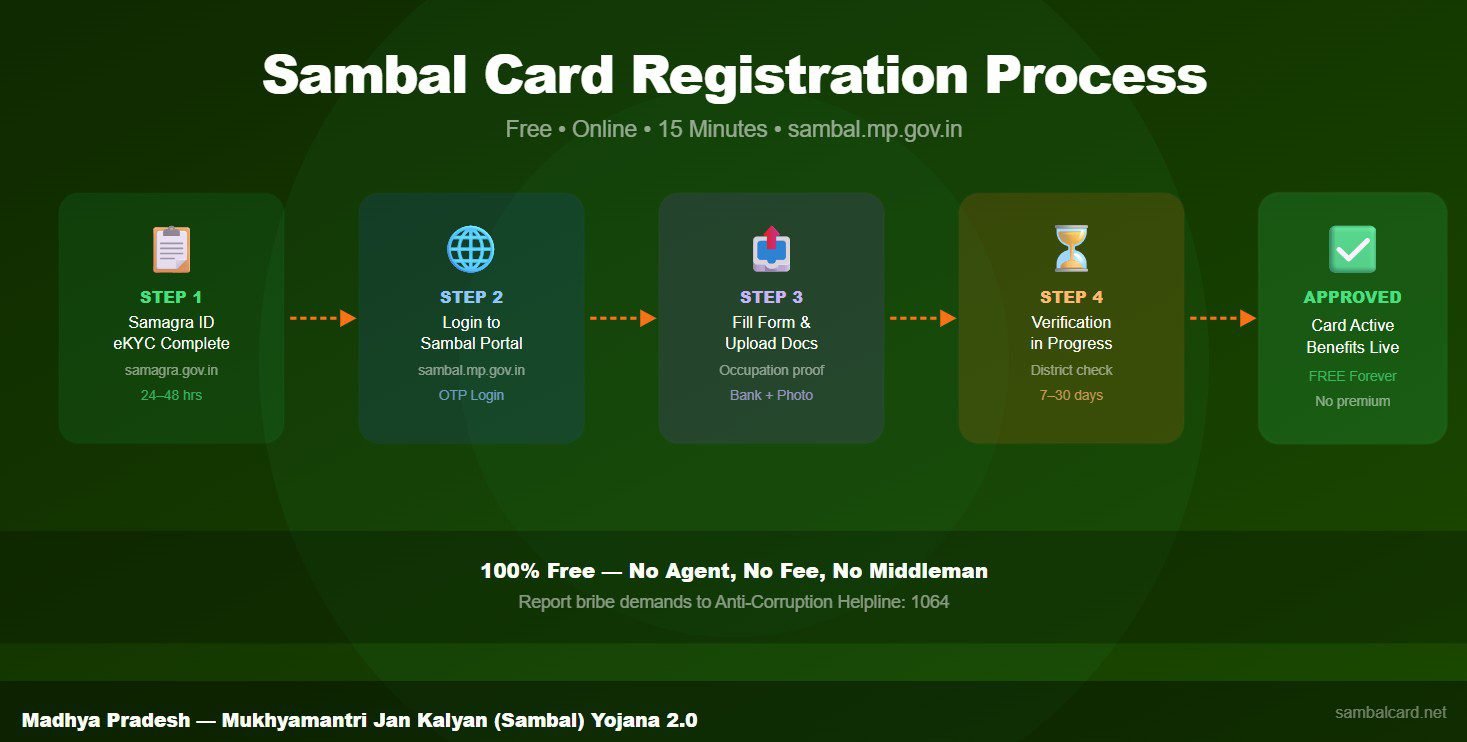
New applicants do not need to “create an account” on the portal separately — your login credential is your existing Samagra ID. The portal uses Samagra as the identity system. Therefore, if you have a Samagra ID with eKYC completed, you can immediately log in and begin your Sambal Card application. There is no separate registration step for the portal itself.
However, if you do not have a Samagra ID, you must first create one at samagra.gov.in before accessing the portal. Creating a Samagra ID takes 2 to 3 days. After that, complete Samagra eKYC, wait 48 hours, and then log in to sambal.mp.gov.in to apply for the Sambal Card.
Key Features Available on Portal
The portal (sambal.mp.gov.in) provides the following key services to registered workers:
- Apply for Sambal Card: Submit a new registration application with occupation proof and bank details
- Check Application Status: View whether your application is Under Verification, Approved, or Rejected
- Download Sambal Card PDF: Get your card as a downloadable PDF after approval
- File Benefit Claims: Submit claims for accident benefit, maternity benefit, death benefit, and education scholarship
- Track Claim Status: Monitor the processing stage of any submitted benefit claim
- Register Nominee: Add or update your nominated beneficiary for accident and death claims
- File Grievances: Submit complaints about pending applications, delayed benefits, or portal errors
- View Benefit History: Check all past benefits credited to your account
For specific tools that complement the portal, use our Benefits Calculator to check your entitlement, and our Documents Checklist Generator to prepare for your application.
How to Use Jankalyan Portal on Mobile
The portal works on mobile phones through any modern browser — Chrome on Android or Safari on iPhone. There is currently no dedicated mobile app for the Sambal/Jankalyan portal. Therefore, always use the browser version at sambal.mp.gov.in on your phone for all activities. Keep your browser updated to the latest version for the best performance and security.
For rural workers with limited internet, the portal is accessible even on 2G/3G connections, though page loading may be slower. Alternatively, all portal services are also available through CSC centres, Gram Panchayat offices, and Jan Seva Kendras for those without reliable personal internet access.
Jankalyan Portal Helpline and Support
If you face login issues, application errors, or any technical problems on the portal, contact the following support channels:
- MP Government Helpline: 181 (toll-free, Monday to Saturday, 9 AM to 6 PM)
- Portal Grievance: sambal.mp.gov.in → Grievance section
- Nearest CSC Centre: Operator can access the portal on your behalf
For a complete helpline guide with escalation steps, visit our Sambal Card Helpline Guide. Additionally, for portal-specific technical errors, our Error Decoder Tool provides instant diagnosis and fixes.
Frequently Asked Questions About Jankalyan Portal
Is there a separate app for Jankalyan portal?
No official standalone app exists for the Jankalyan/Sambal portal as of 2026. All services are available through the browser version at sambal.mp.gov.in on any smartphone or computer. Be cautious of unofficial apps claiming to offer Sambal/Jankalyan services — always use the official portal URL directly.
What is the difference between Jankalyan portal and Samagra portal?
The Jankalyan portal (sambal.mp.gov.in) is for Sambal Card registration and benefit management. The Samagra portal (samagra.gov.in) is the MP citizen data platform where family IDs, eKYC, and household details are maintained. You need Samagra eKYC before using the portal — Samagra is the identity foundation that the Jankalyan portal verifies you against.
Can I access the Jankalyan portal without a smartphone?
Yes. Visit any CSC centre, Jan Seva Kendra, or Gram Panchayat office. The operator at these centres has computer access and can perform all Jankalyan portal services on your behalf — registration, status tracking, benefit claims, card download, and grievance filing. Carry your Samagra ID, Aadhaar card, and your registered mobile phone for OTP verification.